Property managers · Home users
Finding and entering your electricity price information
KotiCharge calculates accurate charging costs from a few details about the electricity contract for each group — whether that's a housing company, a business premises, or a home charger reimbursed by an employer. Here's exactly what to look for, where to find it, and where to fill it in.
Who fills this in, and where?
The pricing details themselves are the same for everyone — only where you go to enter them depends on your role.
Property manager (housing company / business premises)
Fill in the electricity pricing once per group, covering everyone charging at that location. Log in to the KotiCharge Dashboard, select the group, then open Configuration → Pricing and charging info to fill in the pricing fields described below.
Home user (employee reimbursement)
Fill in your own pricing once, on first login. Use whichever is more convenient — the mobile app (Profile → Groups) or the KotiCharge Dashboard (Configuration → Pricing and charging info) — both lead to the same pricing fields.
Why this matters: KotiCharge calculates charging costs from the actual electricity contract behind each group. Getting these numbers right means accurate billing for housing companies and businesses, and fair, accurate reimbursement for home users. This information only needs to be entered once per group.
Where to enter this information
Property manager — KotiCharge Dashboard
- Log in at dashboard.koticharge.fi.
- Select the housing company or business premises group.
- Open Configuration → Pricing and charging info to fill in the pricing fields described below.
Home user — mobile app or Dashboard
- In the app: open the Profile tab, then tap Groups, and select your home charging group — it was created for you automatically.
- Or in the Dashboard: log in at dashboard.koticharge.fi, select your home group, then open Configuration → Pricing and charging info.
- Fill in the pricing fields described below, using the sections underneath.
Spot-price vs fixed price
Check your electricity retailer's contract or invoice to see which type of pricing you have, then select the matching option.
Spot-price contract
Your retailer bills you the actual hourly Nord Pool market price for the electricity you use. Select "Spot-price" in the app. If your retailer adds a fixed margin on top of the market price (shown on your bill as something like "+ 0.5 cnt/kWh"), enter that margin as well — it is added to every hour's spot price.
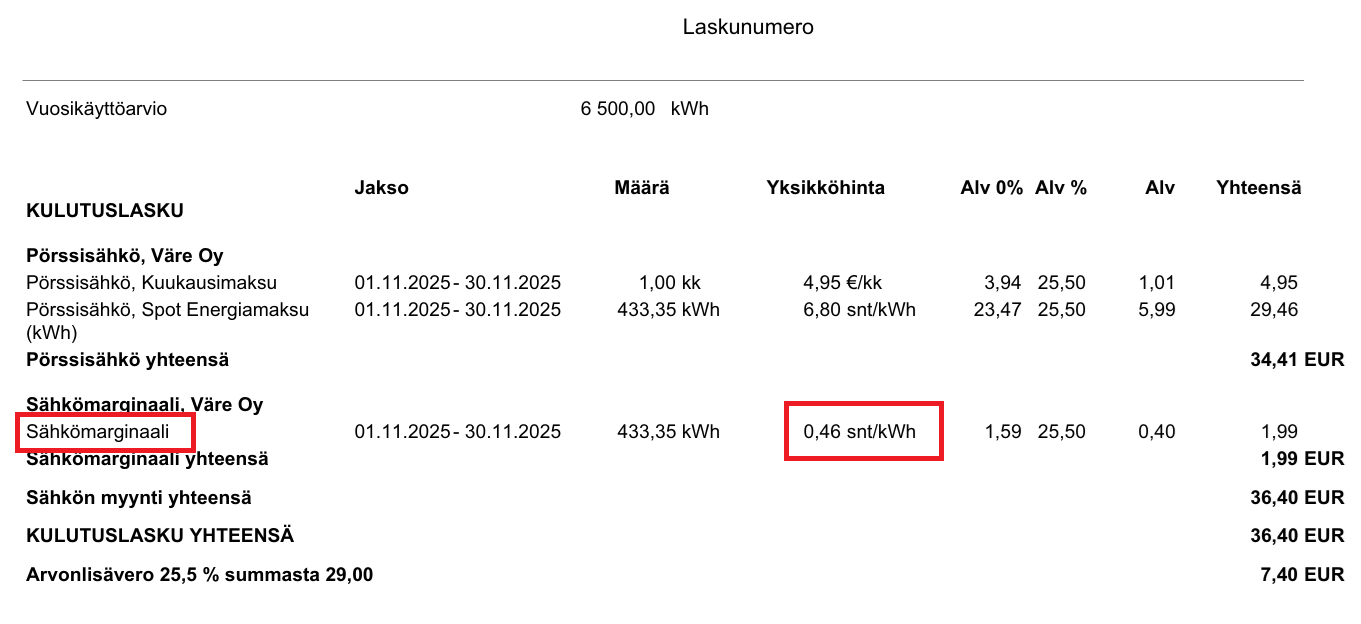
Example: on this Väre invoice, the circled "Sähkömarginaali" line is the spot-price margin — that's the number to enter.
Fixed-price contract
Your retailer charges one constant price per kWh, regardless of when you charge. Select "Fixed price" and enter that rate exactly as shown on your contract or invoice (look for "sähkön hinta" or "energian hinta").
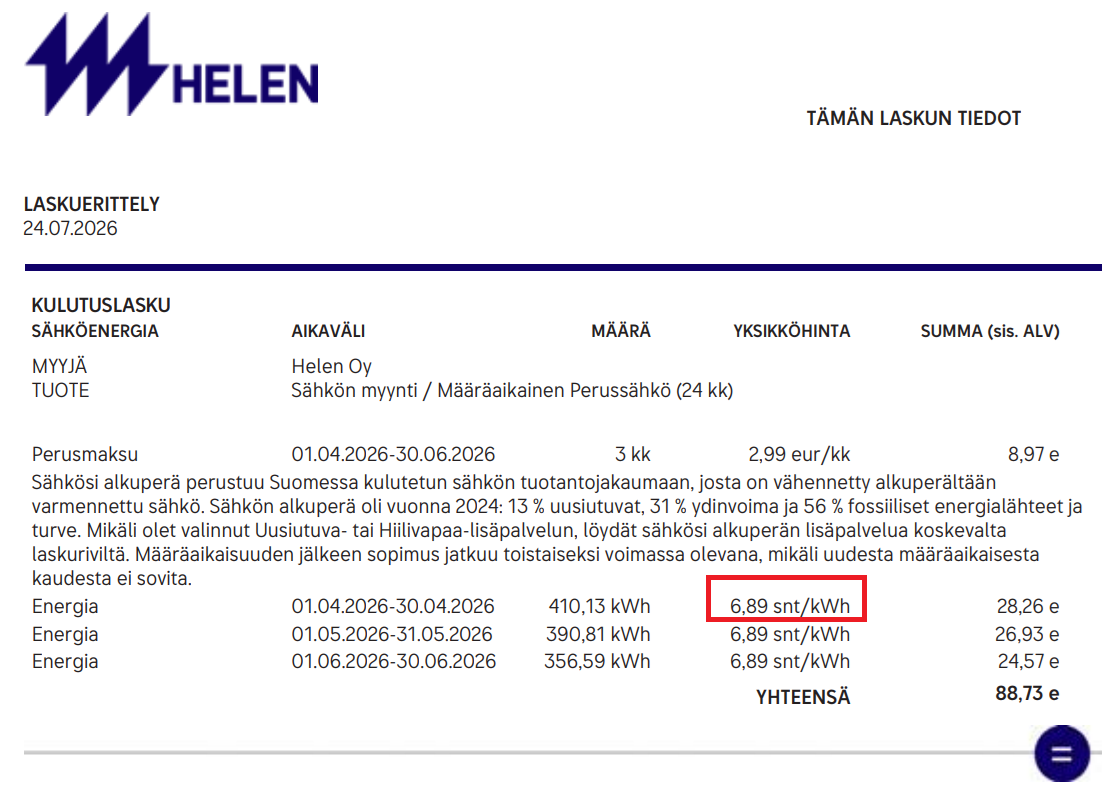
Example: on this Helen invoice, the circled "Energia" unit price is the fixed rate to enter.
Transmission price & electricity tax (siirtohinta + sähkövero)
The transmission price is charged by your local distribution grid company (verkkoyhtiö) — a separate company from your electricity retailer. It appears on a separate invoice, often called your "siirtolasku", together with the electricity tax (sähkövero or valmistevero) — a government tax charged per kWh.
There is one combined field — not a separate tax field
In the KotiCharge app and Dashboard, transmission price and electricity tax are entered together as a single number per time period. Add the transmission price and the electricity tax shown on your invoice, and enter the sum.
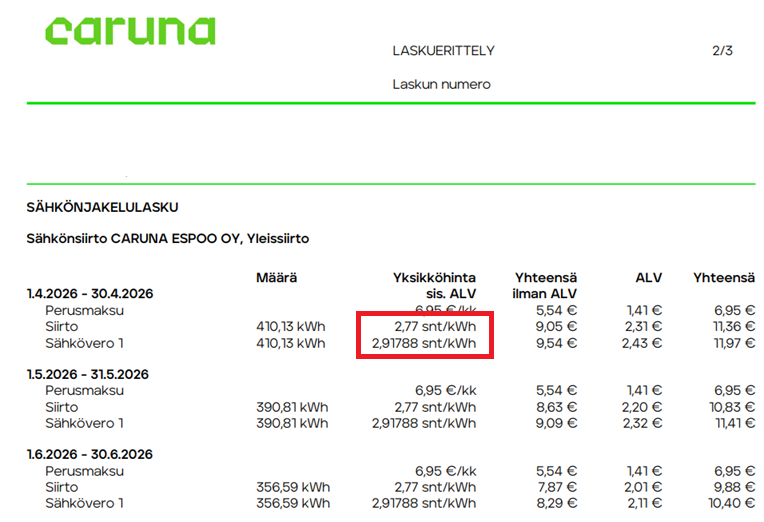
Example: on this Caruna invoice, the circled "Siirto" and "Sähkövero 1" lines are separate — add them together for the combined field.
⚠ Many grid companies charge different transmission prices depending on time
- Day vs. night — for example, a daytime rate (roughly 07:00–22:00) and a cheaper night rate (22:00–07:00).
- Winter vs. summer/season — many grid companies charge a higher "winter weekday daytime" rate (typically November–March) and a lower rate for the rest of the year.
The electricity tax rate itself is normally the same year-round — only the transmission price component changes with time. Add the (constant) tax to each transmission rate before entering it.
Depending on your grid company's tariff, you may need to enter up to four combined price components, in the app or Dashboard:
- Day, winter season (transmission + tax)
- Night, winter season (transmission + tax)
- Day, summer/other season (transmission + tax)
- Night, summer/other season (transmission + tax)
If your grid company uses a single flat transmission price with no day/night or seasonal split, simply add the tax and enter that one combined number. You can find the exact transmission rates and time definitions in your grid company's published price list ("siirtohinnasto"), and the tax rate on the same invoice — look for "sähkövero" or "valmistevero". If the tax isn't itemized separately, use the current official electricity tax rate for your connection type (tax class I for households and most businesses, tax class II for some industrial use), or ask your grid company's customer service to confirm the figures.
Where to find these numbers
- Your electricity retailer's invoice ("sähkölasku") — shows your spot-price margin or fixed price per kWh.
- Your grid company's invoice ("siirtolasku") — shows your transmission price (or prices, if split by time) and the electricity tax.
- Your online customer portal with your electricity retailer and grid company — often shows a clearer, up-to-date breakdown than the paper invoice.
- Customer service — if you're unsure about any figure, your electricity retailer or grid company's customer service can confirm it. You can also contact KotiCharge and we'll help you interpret your bill.
Ready to continue?
Head to the KotiCharge Dashboard or app manual, or get in touch if you'd like help entering your details.